Sprites & Collision
Loading Sprites
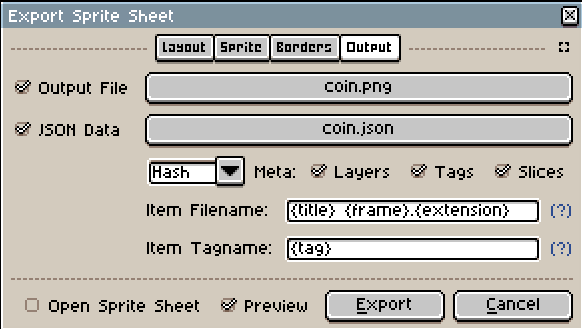
Ajishio supports loading sprites from Aseprite files. Create your
(animated) sprite in Aseprite and export it as both a .png sprite sheet and a .json data file,
both into the same directory in your project.
Load sprites with aj.load_aseprite_sprites, passing the directory path. It returns a
dict[str, aj.GameSprite] keyed by the sprite name you saved in Aseprite:
class Player(aj.PhysicsObject):
    def __init__(self, x: float = 0, y: float = 0, **kwargs: Unpack[aj.GameObjectKwargs]) -> None:
        super().__init__(x, y, **kwargs)
        self.sprite_index = sprites['player']
        self.image_speed = 10
Ajishio automatically animates the sprite at image_speed frames per second. Make sure to call
super().step() and super().draw() in any overridden step/draw methods.
See the platformer
demo for a full example.
Collision Masks
Only rectangular collision masks are currently supported. Set the collision_mask attribute in the
constructor, typically using sprite_width and sprite_height as a starting point:
class Player(aj.GameObject):
    def __init__(self, x: float = 0, y: float = 0, **kwargs: Unpack[aj.GameObjectKwargs]) -> None:
        super().__init__(x, y, **kwargs)
        self.sprite_index = sprites['player']
        self.collision_mask = aj.CollisionMask(
            bbtop=3, bbleft=3, bbright=self.sprite_width - 3, bbbottom=self.sprite_height
        )
Bounding box coordinates are relative to the top-left corner of the sprite.